PLEASE NOTE: Videos might need advanced approval to be opened.
We offer two filters Techloq and Netfree. You can see which one is used on the login screen.
Most of our computers are filtered by Techloq and managed by the TAG of BP.
Netfree computers are usually marked with a sign.

Overview
Filtering is under the auspices of TAG of BP at [email protected]. When corresponding with TAG please specify you are calling from OUTWORQ, which profile (mens or womens), and Techloq ID (if possible).
There are separate filter profiles for Men and Women. Please note that couple computers are using the Men’s profile.
If a site is blocked…
Click “Request Access” and follow the prompts. No password necessary. Between 10am and 11pm It typically takes 1 to 5 minutes for them to review the content. After hours it may take significantly longer.
If after that time the page is still blocked, it’s possible that the page was not approved. You can call or email customer service to find out.
If your website was not approved, You must contact TAG of BP directly at 718-225-5824 or email [email protected] to ask them to unblock your site. We do not have any access or permission to override their decision.
If any above methods do not work, call customer service for all available options.
To unblock an image or video on an open page…
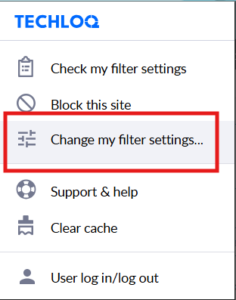
In the upper right corner of your browser click on the “puzzle piece” or “Techloq” chrome extension icon.

If the icon does not exist, click on this link and click install. If it says “not enabled”, go ahead and enable the extension.
Click “Change Site Settings” or “Change my filter settings” and follow the prompts. If you are only unblocking an image, leave the video filter on. This will decrease the time it takes to get approved.
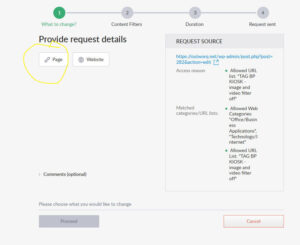
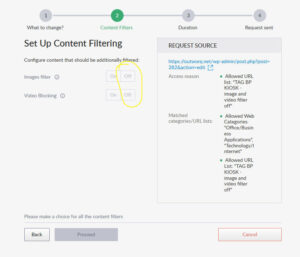
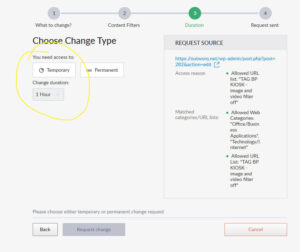
Please allow a few minutes for a response.
After a few minutes clear the cache.
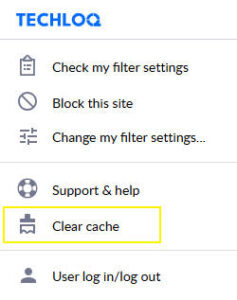
If the image is not unblocked within 5 – 10 minutes the request might have been rejected. You can contact TAG of BP directly for further support.
If any above methods do not work, call customer service for all available options.
To Unblock a Youtube Video
To unblock a Youtube or similar video click here.
If any above methods do not work, call customer service for all available options.
If a site is opened but showing an error
You can contact Tag of BP or contact Techloq directly by calling 845-237-5501
Contact Tag of BP by email [email protected]
If any above methods do not work, call customer service for all available options.

Overview
Highest level of shmirah, more secure than all other filters in many, many ways.
Support
ONLY AVAILABLE WHERE POSTED. To request a blocked Website, Video, or Image on Netfree:
Press “Click here to submit a request for a review”. When it shows the input for a phone number, press Alt and Z together.
Please email [email protected]
You may also open a Netfree account and submit an internet traffic recording. Netfree points are not needed for technical issues.
Phone Support: 718-400-8838